Case study · 2026

Copilot

A dense data console for logistics ops. Shortened time-to-decision on routing exceptions from 9 minutes to 90 seconds.

Role
Lead Product Designer
Contributors
Product Manager, UXR, Devs
Platform
B2B SaaS
Timeline
6 months
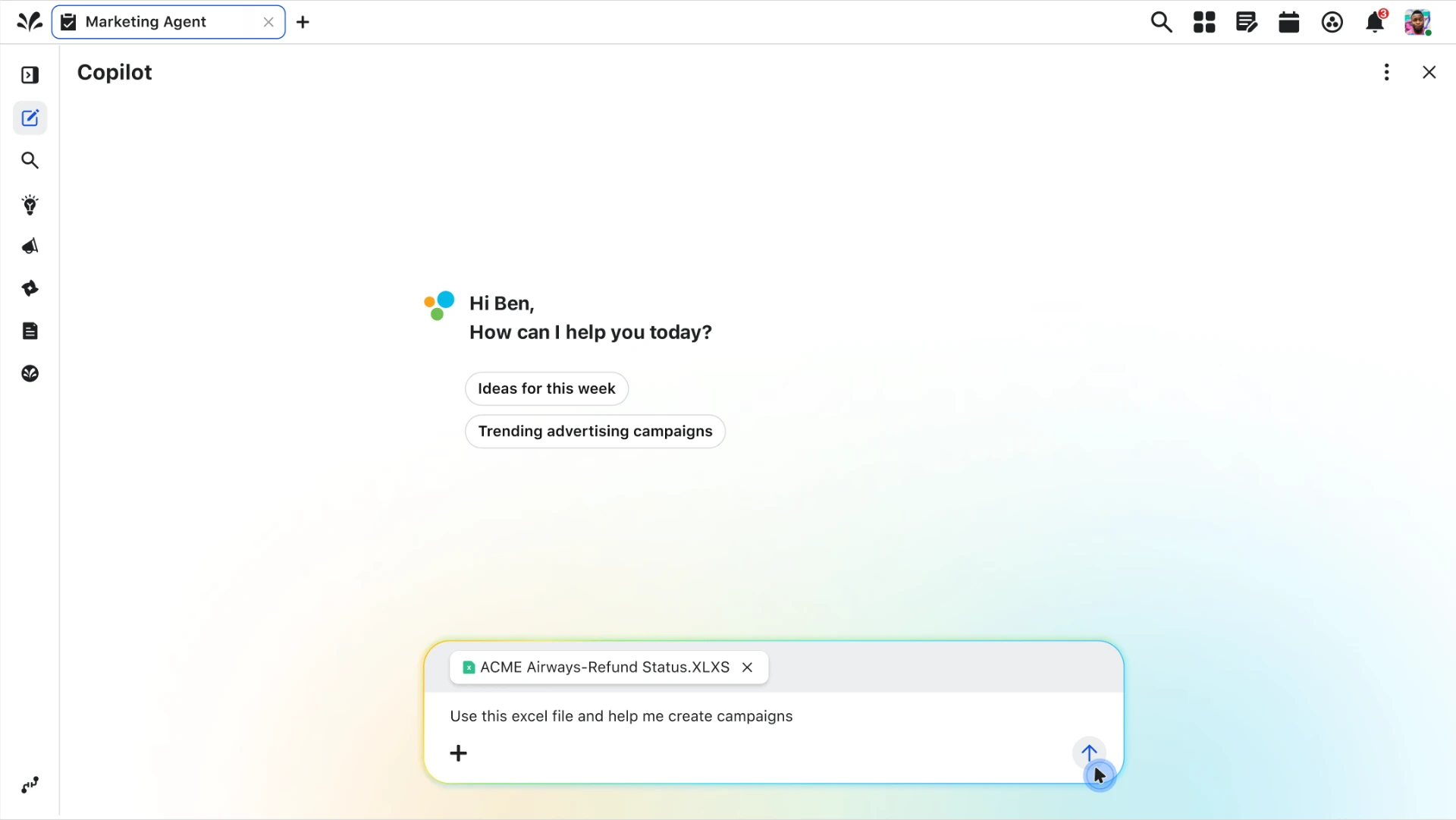
Copilot chat interface with a media plan spreadsheet attached
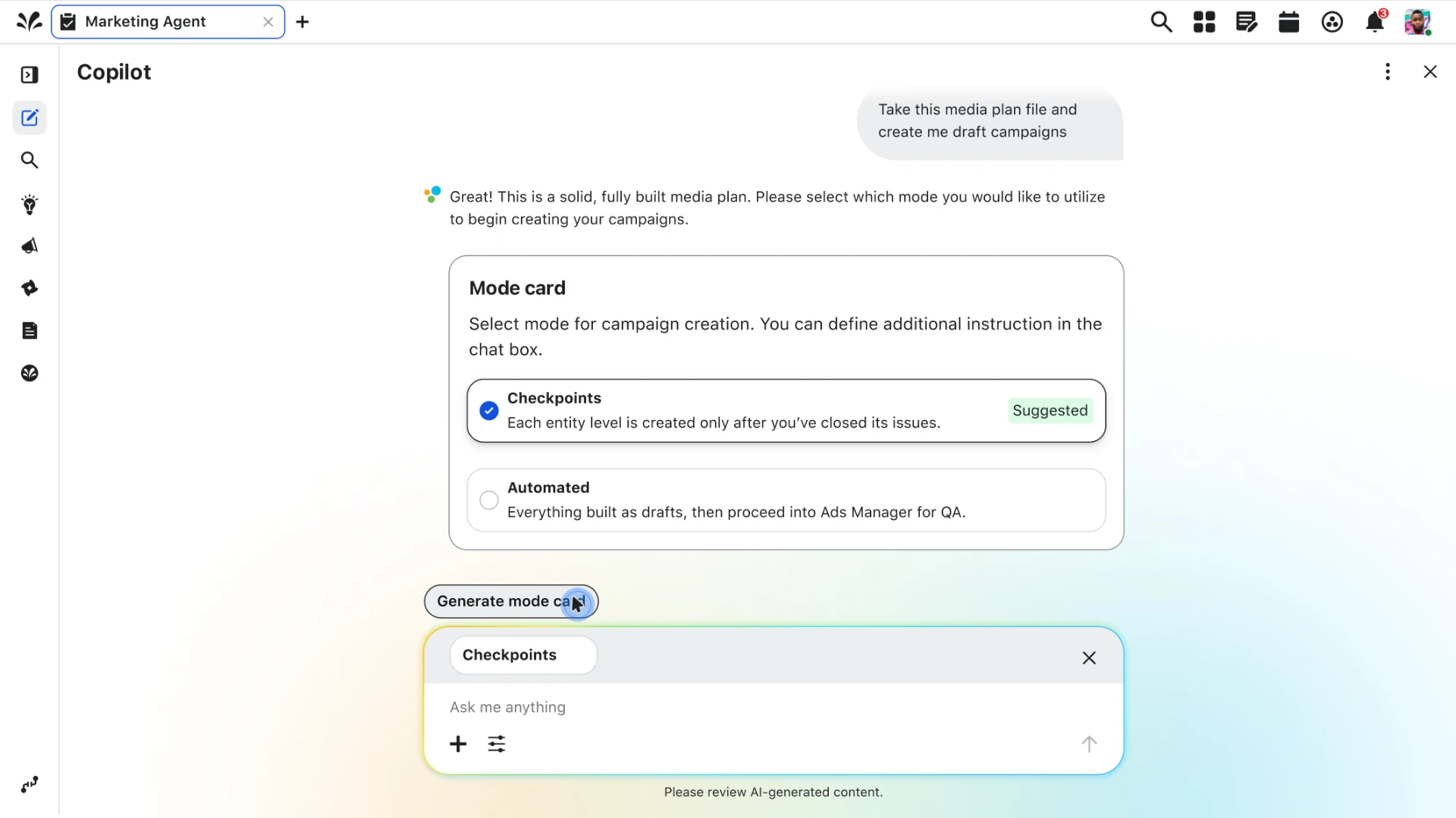
Copilot mode card offering checkpoint or automated campaign creation
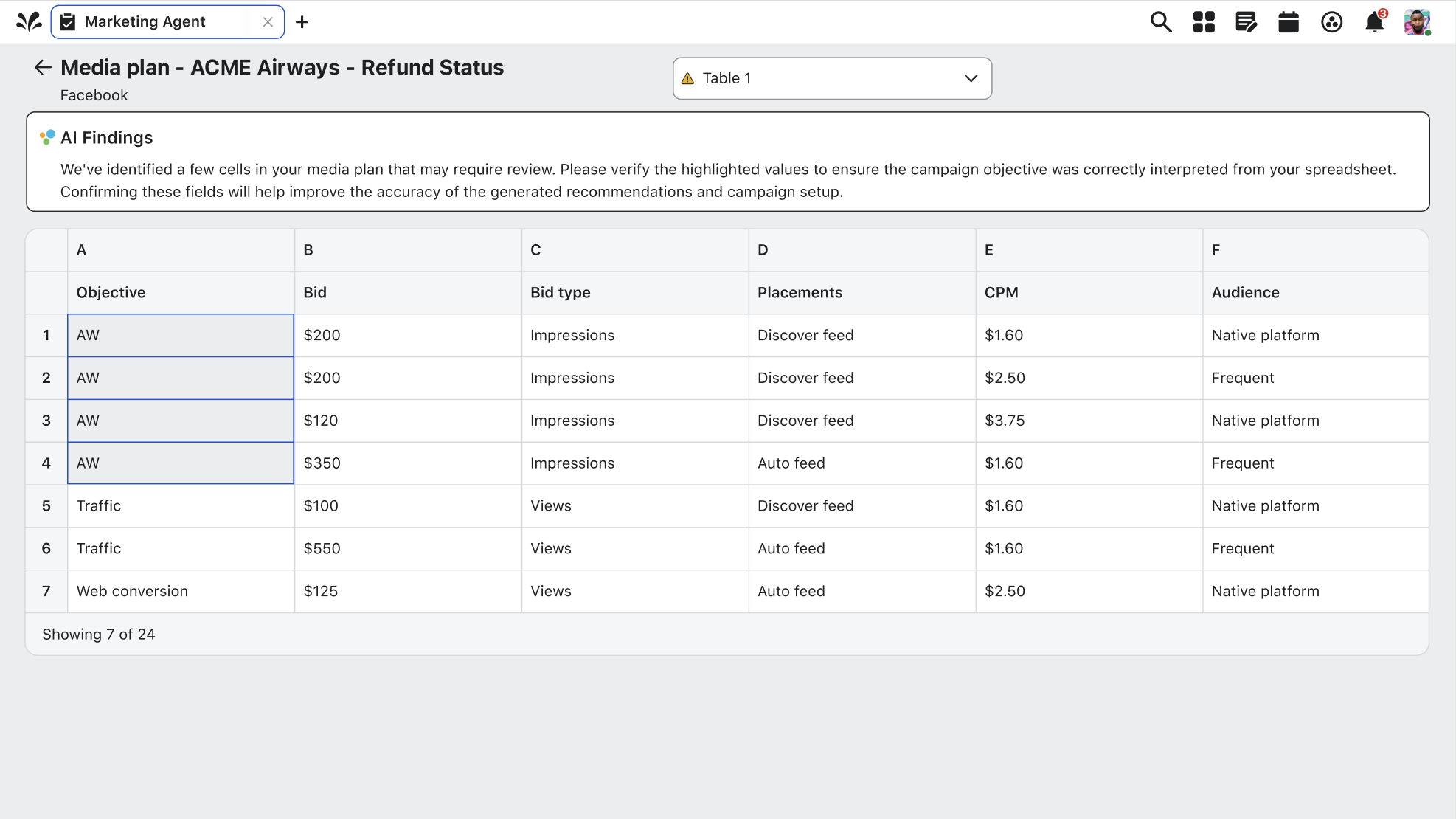
Parsed media plan table with AI findings flagging cells that need review
The problem

A media plan is a finished decision — then the re-typing begins.

A media plan is a finished decision. An agency or planning team has already chosen the channels, budgets, audiences, flights, and objectives — and written them into an Excel file. Then a practitioner at the brand spends half a day re-typing that file into the ad platform, row by row, field by field, across two screens.

Three things make this worse than ordinary drudge work:

  1. The file is messy by nature. A real plan has 10+ tabs (only 1–2 matter), merged cells, words that aren't the platform's words — a code like AW for Awareness, or a full word like Consideration where Meta calls it Awareness — columns that mean things only the author knows, and gaps. Real plans routinely omit optimization goals, imply audiences instead of defining them, and never name ad accounts.
  2. The practitioner answers for every field. When QA flags a budget, the file said so must be provable. Today that proof lives only in the practitioner's memory of having typed it.
  3. The volume is real. Plans run to dozens or hundreds of rows and 80+ columns. One enterprise plan we ground this work in: $6.18M, 11 tabs, 51 campaigns, 73 ad sets.
What we're building

Move the practitioner's effort from typing to judging.

An agent inside Copilot chat that does the mechanical build, so the practitioner's effort moves from typing to judging. The user hands over the file; the agent reads it, drafts the campaigns, ad sets, and ads, and brings the human in only where the plan is unclear, incomplete, or wrong. Target: a 50-ad-set plan is QA-ready in ~15 minutes, with the user touching fewer than 15% of the fields.

The journey

Six gates from file to finished campaign.

Each step gives the practitioner control before the agent moves forward. The goal is trust, not speed at any cost.

  • 01

    Set the terms of the collaboration

    When handing over a plan, users decide how involved they want to be — run it all and check once at the end, or pause at each stage — so the session matches how much they trust the plan.

  • 02

    Declare which parts of the file are real

    A file may have 12 tabs, but only two hold the plan. The rest are rate cards, old-year archives, and empty sheets. Confirming what gets read before anything is read keeps stale data out of campaigns.

  • 03

    Lock where the work will land

    Plans never name ad accounts. Before anything is read, the destination is fixed and visible for the rest of the session — because work landing on the wrong account is the worst outcome this product can cause.

  • 04

    Know what's happening — and be free to leave

    Reading and building takes minutes. Users see what the agent is doing well enough to trust it, and can walk away — waiting must never be the cost of using this.

  • 05

    Confirm how the file was read

    The agent learns things no one told it: which column is the budget, what the date format is, which rows merge into one campaign. Users review that reading — columns and structure — in one glance, and correct it there.

  • 06

    Close a level before the next is built

    Stage gates keep upstream decisions resolved before downstream work begins: campaigns drafted before ad sets exist, each audience reviewed once and applied to every ad set that shares it — with platform rejections surfaced before publish.

Design Ideas

Exploring the workflow, before the brand.

We began collaborating with product managers on design ideas that helps us understand the workflow and requirements that are needed to accomplish the task at hand. One thing we kept in mind with these iterations was they were not shown in Sprinklr's branding.

Assignment panel — 12 initiatives get ad accounts by search and select
Assignment panel — the plan never names ad accounts
Mode card — how the run behaves
Sheet picker — which tabs get read
Account card — lock before reading
Plan summary — the plan in a few numbers
Design tradeoffs

Two decisions that shaped the product.

Each tradeoff came down to the same tension: how much simplicity we were willing to give up in exchange for accuracy and trust. In both cases we chose the option that kept the practitioner in control of the plan.

01

Centralized AI conversation vs. contextual feedback

Keeping all user input within a single Copilot chat vs. allowing users to provide feedback at the specific spreadsheet level.

Context

Because media plans contain multiple tabs, campaigns, and hundreds of fields, we needed to decide how users should communicate changes to Copilot. A single chat experience created a simpler interaction, but lacked the necessary context for users working with complex spreadsheets.

Option A — Single Copilot chat
  • Cleaner, more familiar conversational experience
  • Reduced interface complexity
  • Difficult for Copilot to understand which tab, campaign, or field the user is referencing
  • Increased risk of incorrect updates across large media plans
Option B — Contextual feedback by tab/section
  • Anchors feedback to a specific area of the plan
  • Improves AI accuracy and user confidence
  • Makes it easier to validate changes
  • Introduces additional interaction points within the experience
Decision

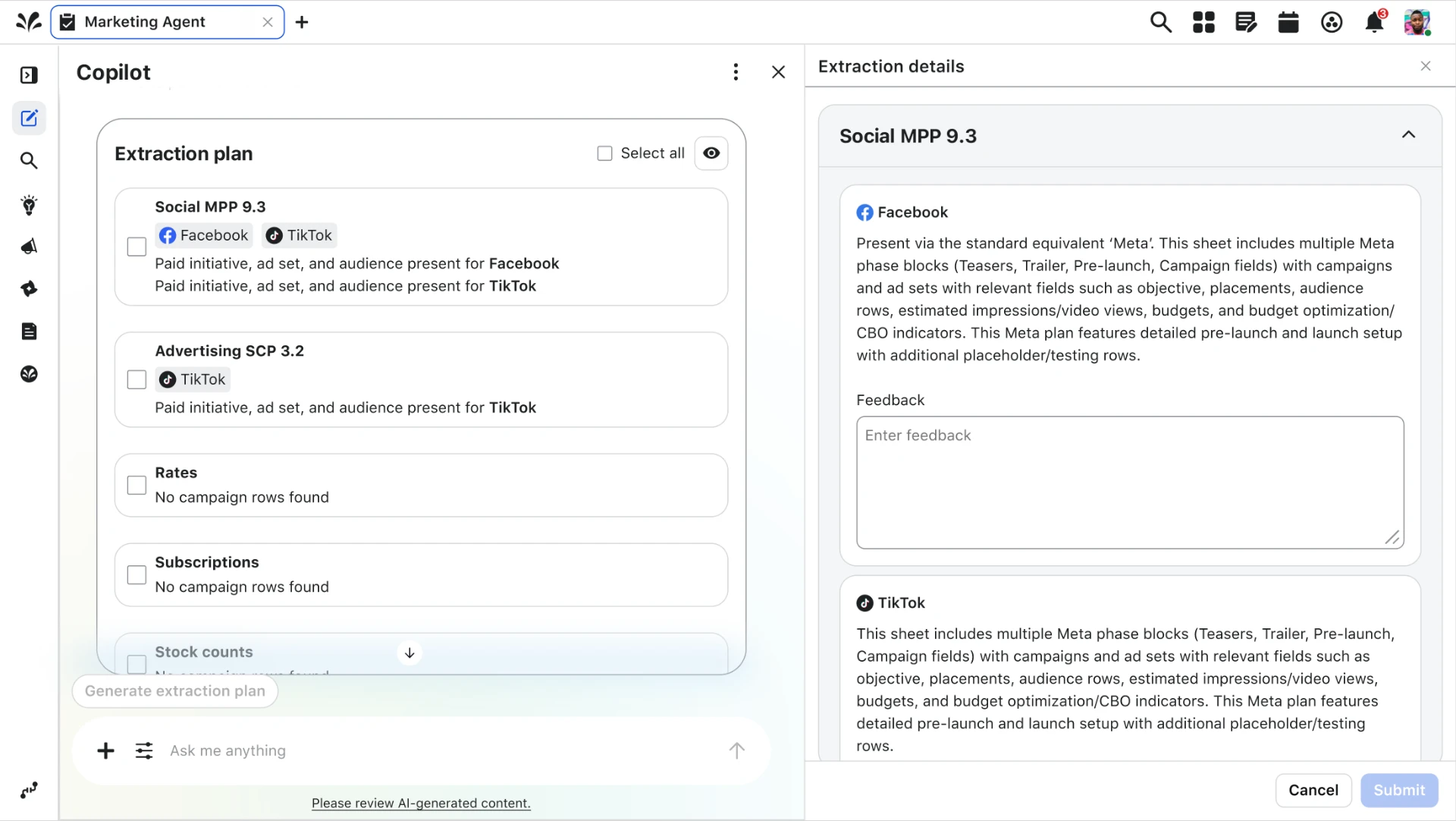
We prioritized contextual accuracy over interface simplicity. By allowing users to provide feedback at the tab level, Copilot could better understand the user's intent and make targeted updates without requiring users to repeatedly explain spreadsheet context.
02

Full automation vs. human validation

Allowing Copilot to fully build the media plan vs. keeping practitioners involved in key decision points.

Context

The goal was to reduce hours of manual data entry, but media plans often contain missing information, ambiguous naming conventions, and undocumented decisions that only the practitioner understands.

Option A — Fully automated build
  • Maximum time savings
  • Removes repetitive manual work
  • Higher risk of incorrect assumptions
  • Limited transparency into why decisions were made
Option B — AI-assisted workflow with human validation
  • Preserves practitioner ownership and judgment
  • Allows users to review assumptions before publishing
  • Builds trust in AI-generated outputs
  • Requires additional review steps
Decision

We designed Copilot as a collaborator rather than a replacement. The system handles repetitive setup work while bringing practitioners in when clarification, validation, or decision-making is required.

Final designs

The plan hands itself over — the practitioner only judges.

The finished flow answers the problem directly: instead of half a day re-typing a messy Excel plan field by field, the practitioner drops the file into Copilot chat and sets the terms once. The agent declares which tabs are real, locks the ad accounts before reading anything, extracts the initiatives, and surfaces only the fields that are unclear or missing. Every value carries its origin back to the plan, so when QA asks "the file said so" is provable — not remembered. Typing became judging.

01

Hand over the file

The plan enters the workflow as an attachment in chat — no template, no re-formatting. Half a day of re-typing starts as one sentence.

Copilot chat with the media plan file attached
02

Set the terms

Checkpoints or automated. The practitioner decides up front how much of the build they want to watch, matching the session to how much they trust the plan.

Mode card offering checkpoints or automated build
03

Declare which tabs are real

Eleven tabs, two that matter. Sheets are confirmed — with the agent's reasoning shown per sheet — before a single row is read, so rate cards and archives never leak into campaigns.

Extraction plan listing which sheets get read
04

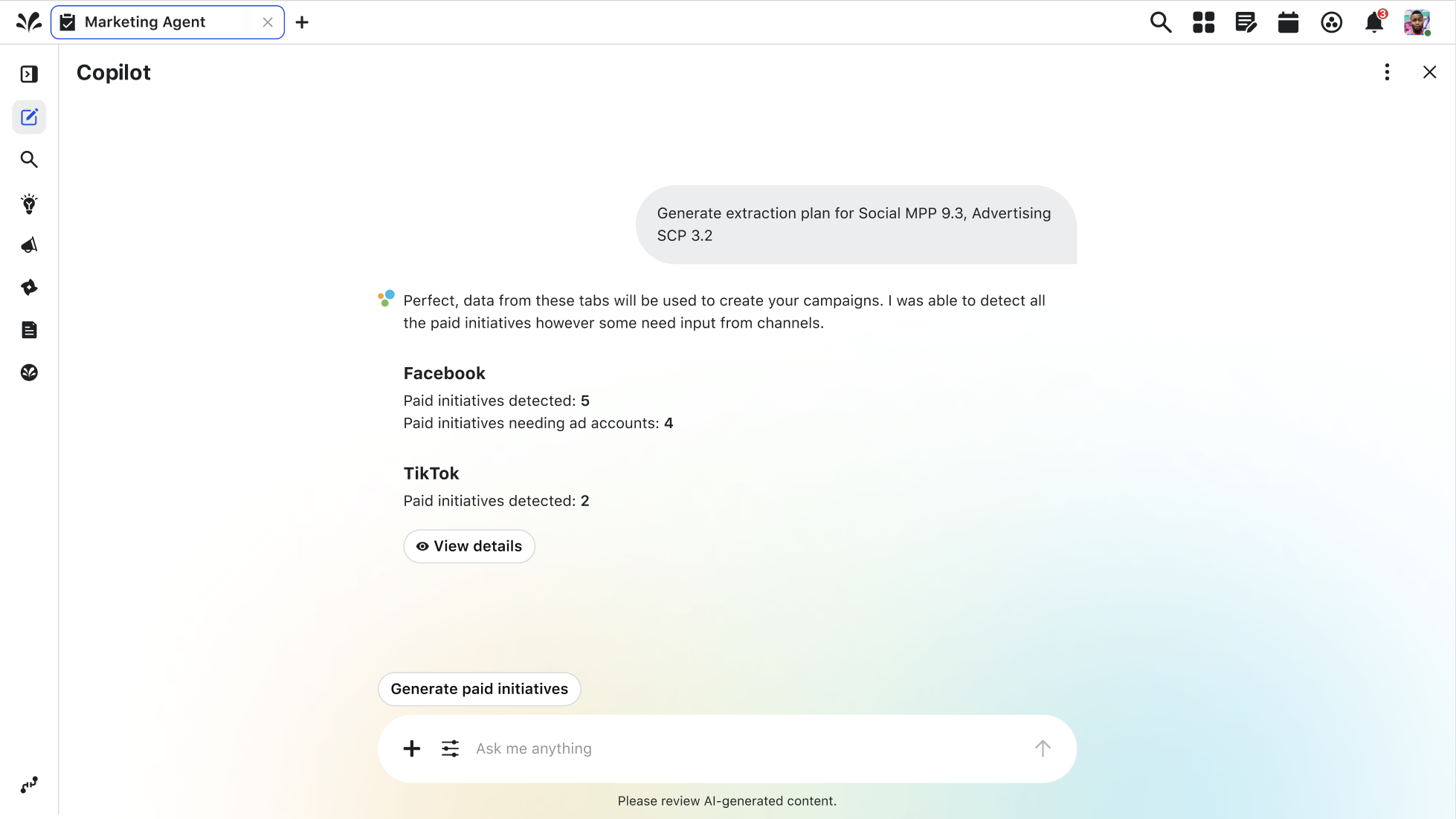
Confirm how the file was read

The reading is summarized per channel before anything is built: initiatives detected, and exactly which ones are still missing information.

Detected paid initiatives summarized per channel
05

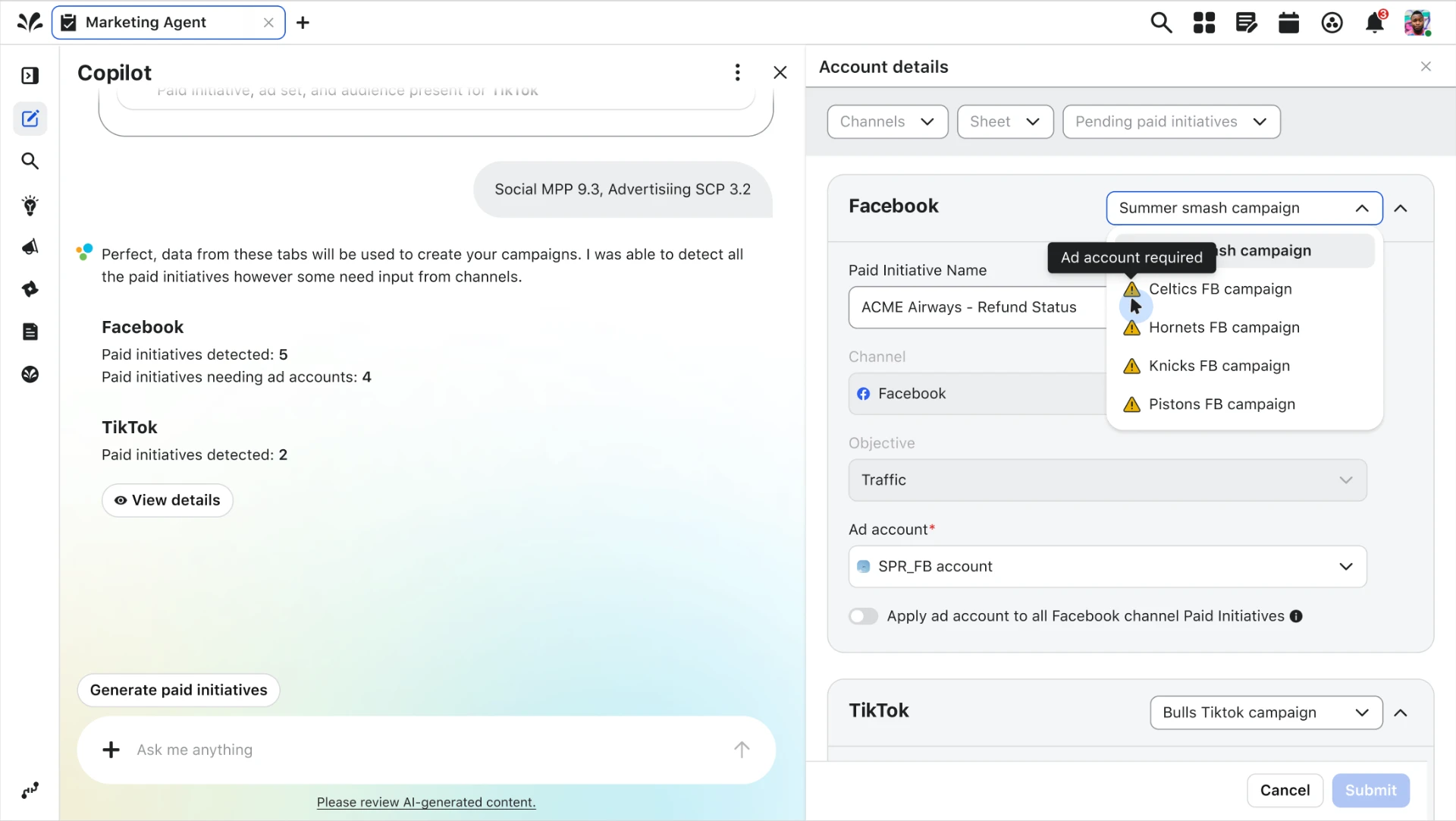
Lock the destination

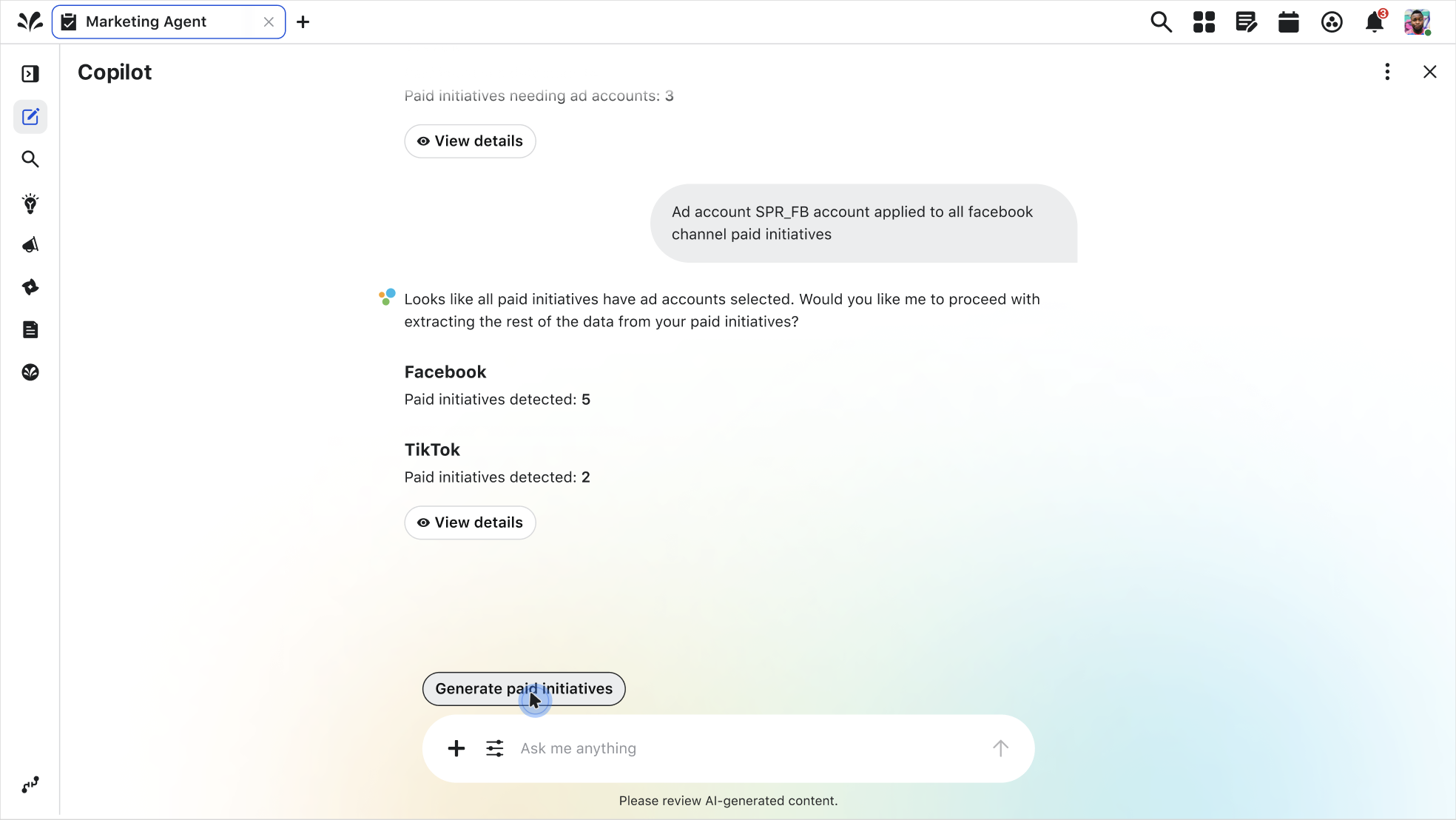
Plans never name ad accounts. Each initiative gets one explicitly — or one account applies to every initiative on the channel — because landing work on the wrong account is the worst outcome this product can cause.

Account details panel assigning ad accounts to initiatives
06

Close the gate, then build

Nothing downstream begins until the level above is resolved. Once every initiative has an account, the agent asks to proceed.

Confirmation that every initiative has an ad account
07

Judge, don't type

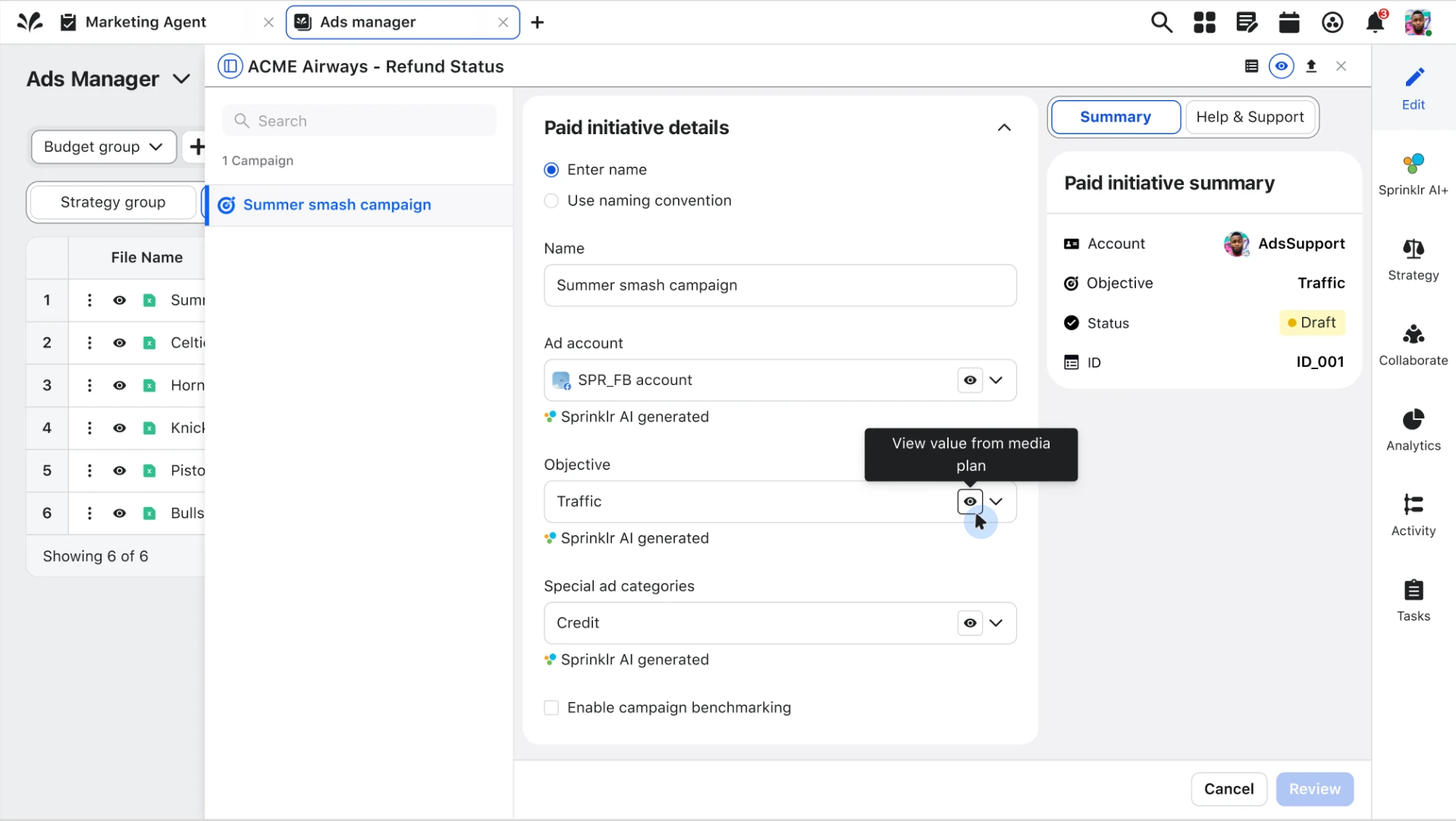
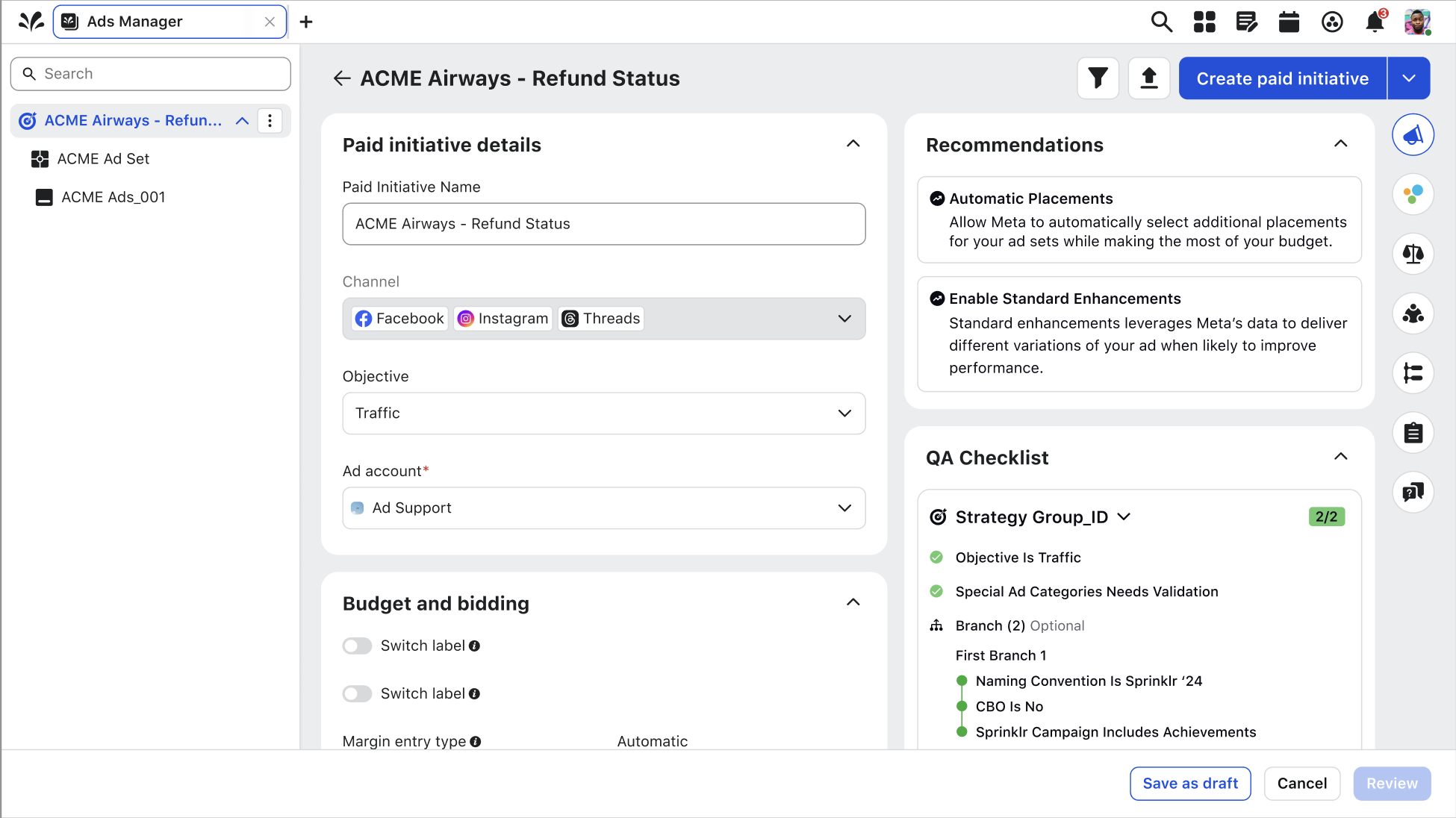
Drafts land in Ads Manager with each generated field traceable back to the cell it came from — so when QA asks, "the file said so" is provable, not remembered.

Ads Manager draft with each field traceable to the media plan
Next Steps

Shipping, listening, and iterating toward the 26.10 release.

The Copilot media-plan agent is currently in development for the 26.10 release. The team is focused on hardening the extraction pipeline, expanding account-mapping coverage, and refining the validation checkpoints that keep practitioners in control.

Alongside engineering, we are continuing to gather feedback and insights from internal teams and ad practitioners who use the platform every day. Their input is shaping which errors to surface first, where to add more transparency, and how to make the handoff from file to campaign feel even more predictable.

More case studies

View all work →