Sprinklr Campaign Checklist
A user-defined checklist that adds an extra layer of verification for campaigns, reinforcing brand governance and reducing the risk of preventable mistakes before launch.
- Role
- Product Designer
- Contributors
- Design Manager, Product Manager, UX Researcher, Developer
- Platform
- Desktop Web
- Timeline
- 4 months
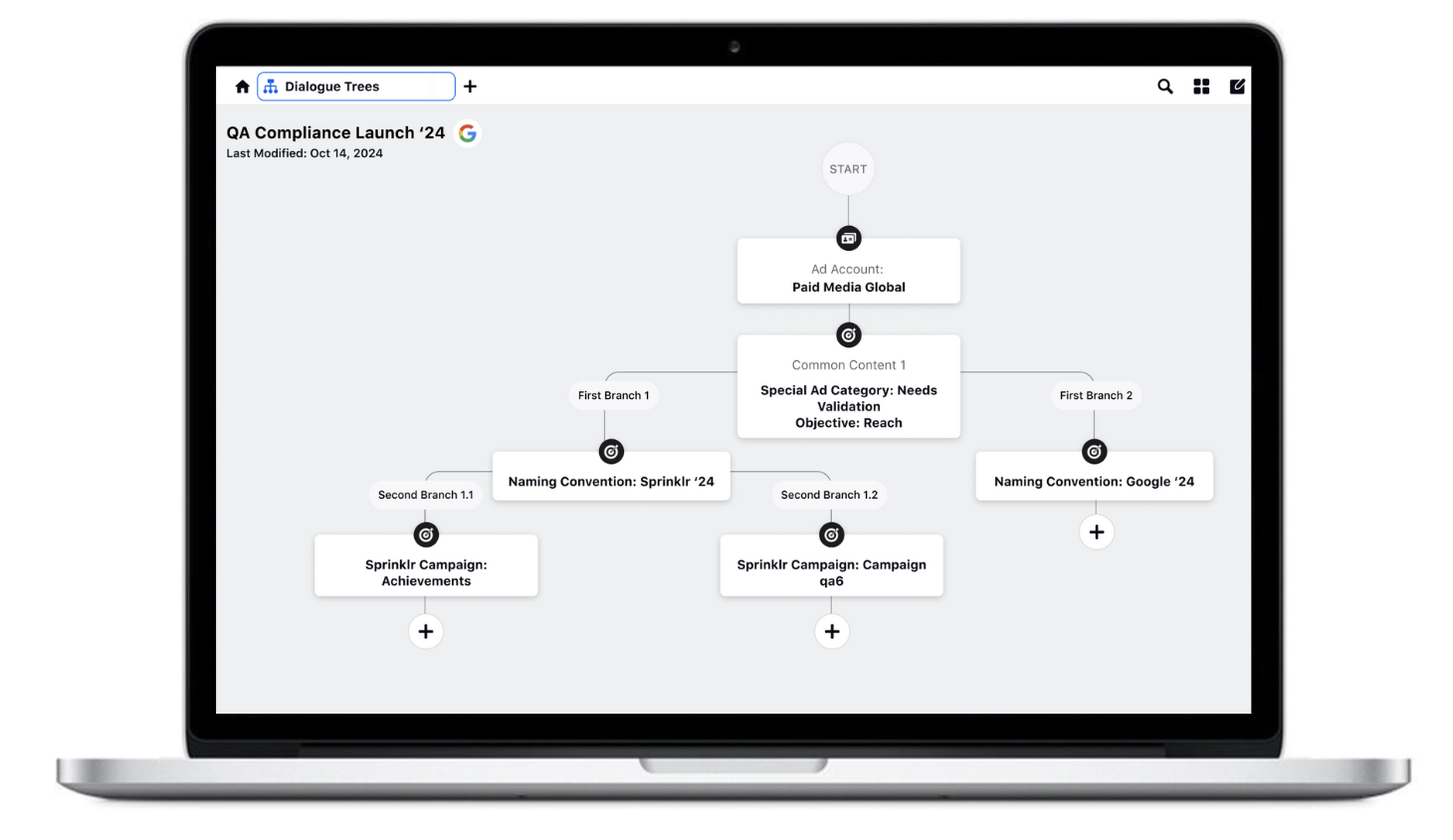
Give teams a safety net without slowing them down.
Campaigns at Sprinklr move through many hands — strategists, creatives, paid media managers, and brand reviewers. Small errors in targeting, copy, or compliance can slip through and become expensive problems once a campaign is live.
We designed a Campaign Checklist feature that lets teams define their own verification rules, then surface those checks at the right moment in the publishing workflow. The result is a lightweight governance layer that feels helpful, not bureaucratic.
Unchecked campaigns lead to off-brand advertising.
Brands encounter challenges related to unchecked campaigns, resulting in off-brand advertising. Despite providing detailed guidelines for campaign creation, there is a lack of real-time verification until the campaign goes live. This poses the risk of potential monetary losses and accountability issues for brands.
Various issues contribute to this problem, including incorrect targeting, reaching the wrong audience, and allocating budget to the wrong objective or optimization goals. To mitigate these issues, there is a pressing need for a unified platform that streamlines the entire advertising process, which can be done by the campaign checklist.
A user-defined checklist that reinforces brand governance.
This user-defined checklist serves as an additional layer of verification for important fields like Objective, Budget, Optimization Goals, Timelines, and Ad Types for all campaigns, reinforcing brand governance. Brands have the ability to tailor the checklist to specific requirements and seamlessly apply it at the account or group level to validate all campaign properties published from their account.
With this automated, user-friendly checklist, it replaces offline methods such as Excel or Google Sheets, offering a seamless and efficient way to maintain brand compliance across all advertising efforts.
Use Cases + Personas
Use Case
Media Managers can define their own checklist of parameters they want to use for approvals. Users can define the list of checks commonly followed and save them as a template. Checks can be edited on the flow for any specific campaign.
Competitive analysis
Collaborated with internal stakeholders to dive deep into a competitive analysis that focuses on what works well, and where opportunities arise from our competitors. Companies such as Skai and Adfidence provided many insightful features that helped us leverage our designs to answer the problems our users are facing in the platform.
| Module | Sprinklr | Skai | Adfidence | |
|---|---|---|---|---|
| Guideline Setup | ||||
| Reporting Insights | ||||
| Automatic Application | ||||
| Ads Publishing Capabilities | ||||
| Creative Compliance | ||||
| Channel Coverage |
Adfidence strengths
- Comprehensive Channel Coverage: Cover 7+ channels including Meta, Amazon, Google, TikTok
- Campaign Scoring: Aggregate scores of campaign performance against guidelines
- Insights: Mapping campaign meta data against spend and guidelines to provide actionable insights
- User Actionability: Improvement recommendations for campaigns with detailed user actions outlined
Adfidence weaknesses
- Publishing Capabilities: No support of campaign publishing, as a key differentiator from competitors
- Daily Evaluation: Campaigns are only evaluated daily, with early refresh not allowed
- No Creative Guidelines Support: Lacks guideline setup at ad variant and creative level
Journey map
This helped me understand the users workflow and the steps they will take from creating a campaign to validating fields. Was also helpful to align all internal stakeholders on the understanding of how users will interact with the product feature.
Campaign Creation
Defining objectives and drafting creative assets.
Checklist Validation
Automated compliance and brand safety checks.
Approvals
Cross-functional sign-off from key stakeholders.
Go-live
Publishing across unified digital channels.
Reporting
Real-time performance analytics and insights.
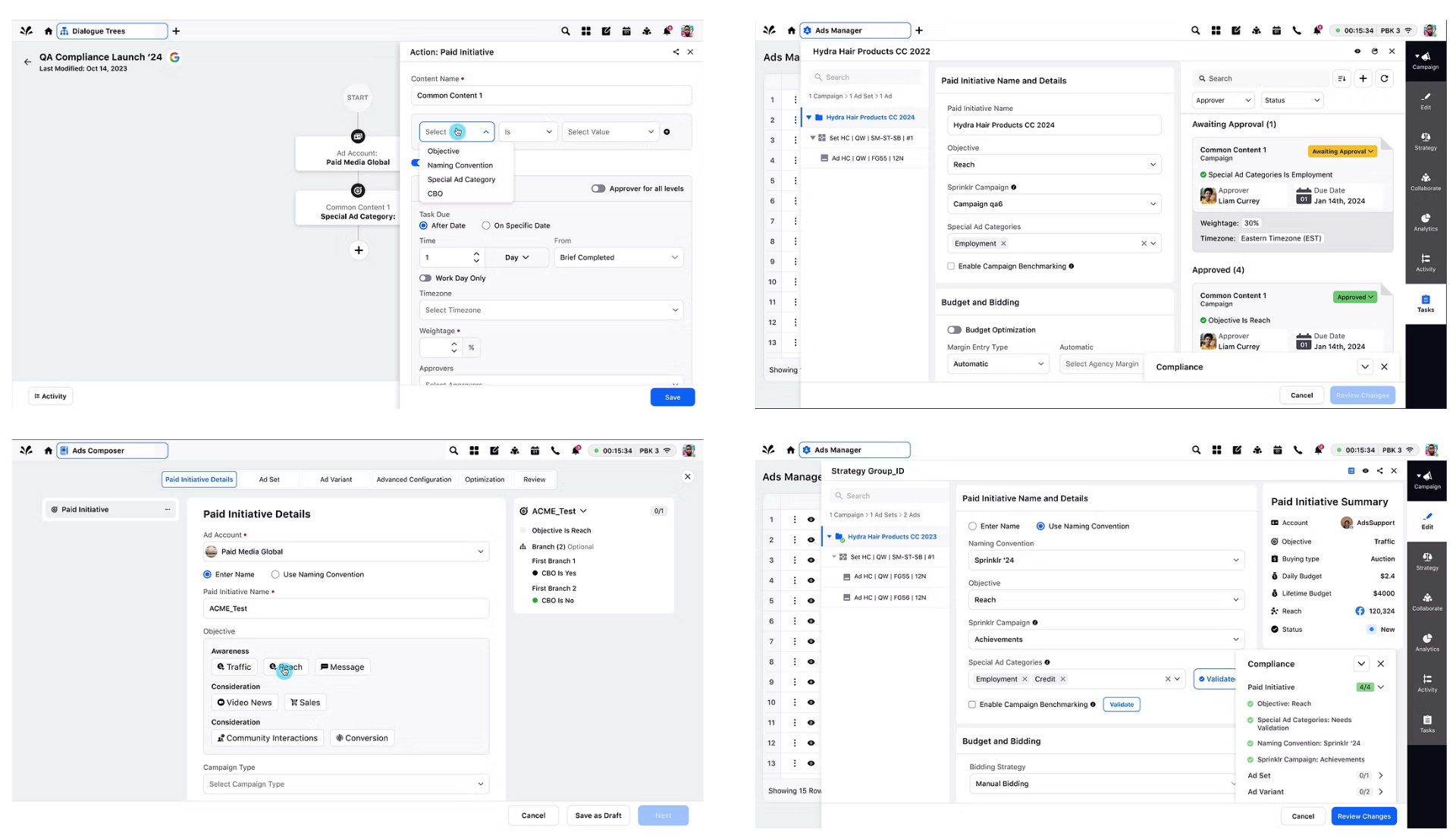
Design explorations
A range of interface concepts explored to balance robust governance with a lightweight publishing workflow. These explorations informed the final design direction for the campaign checklist and approval experience.
Final designs
A two-step flow: browse and manage existing checklists, then build a new one with a guided, node-based workflow.
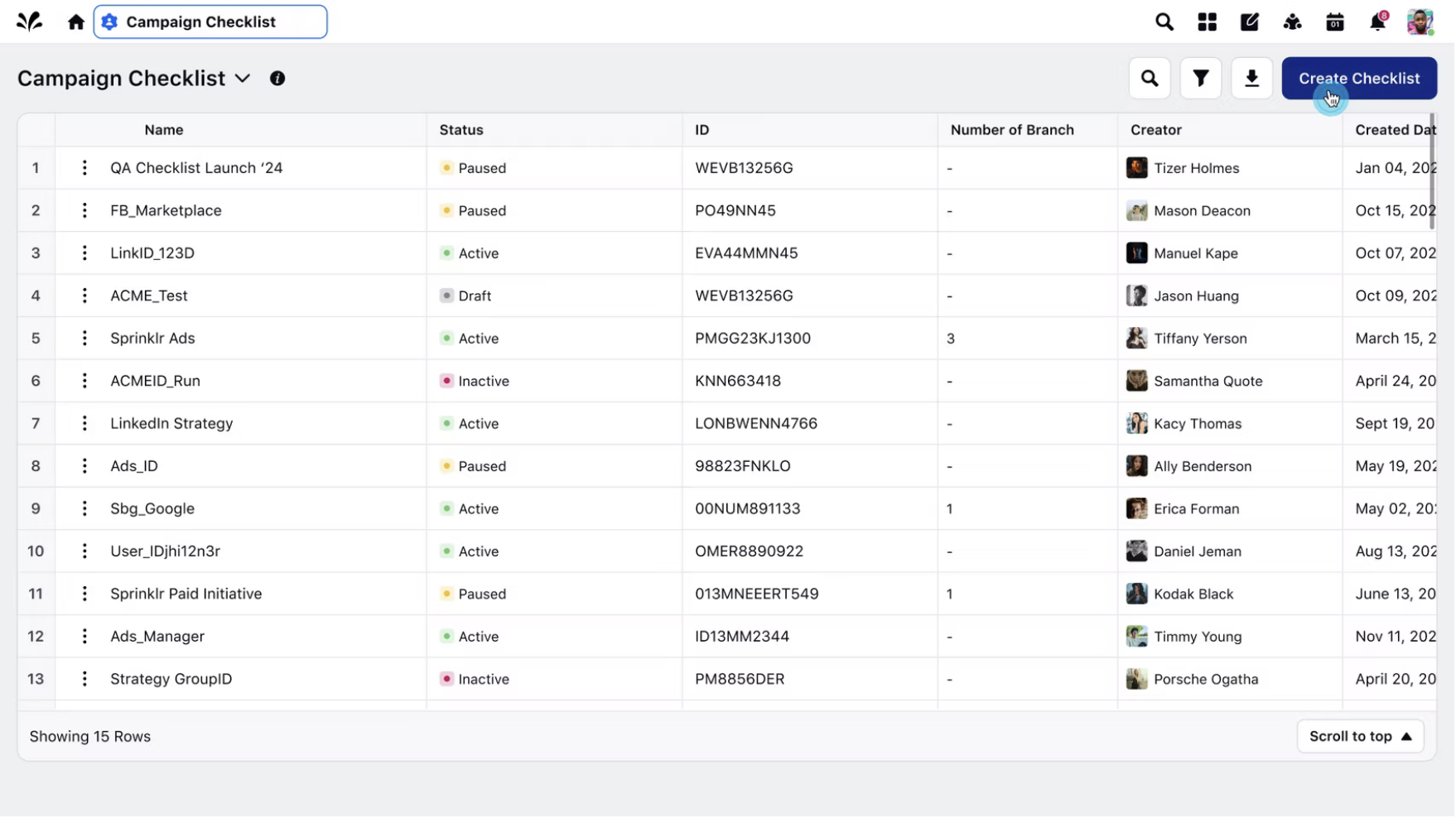
Table view
User begins in the Campaign Checklist table view, where they can view, edit, clone, or delete checklists that exist. To create a new checklist, user clicks the CTA on the top right.
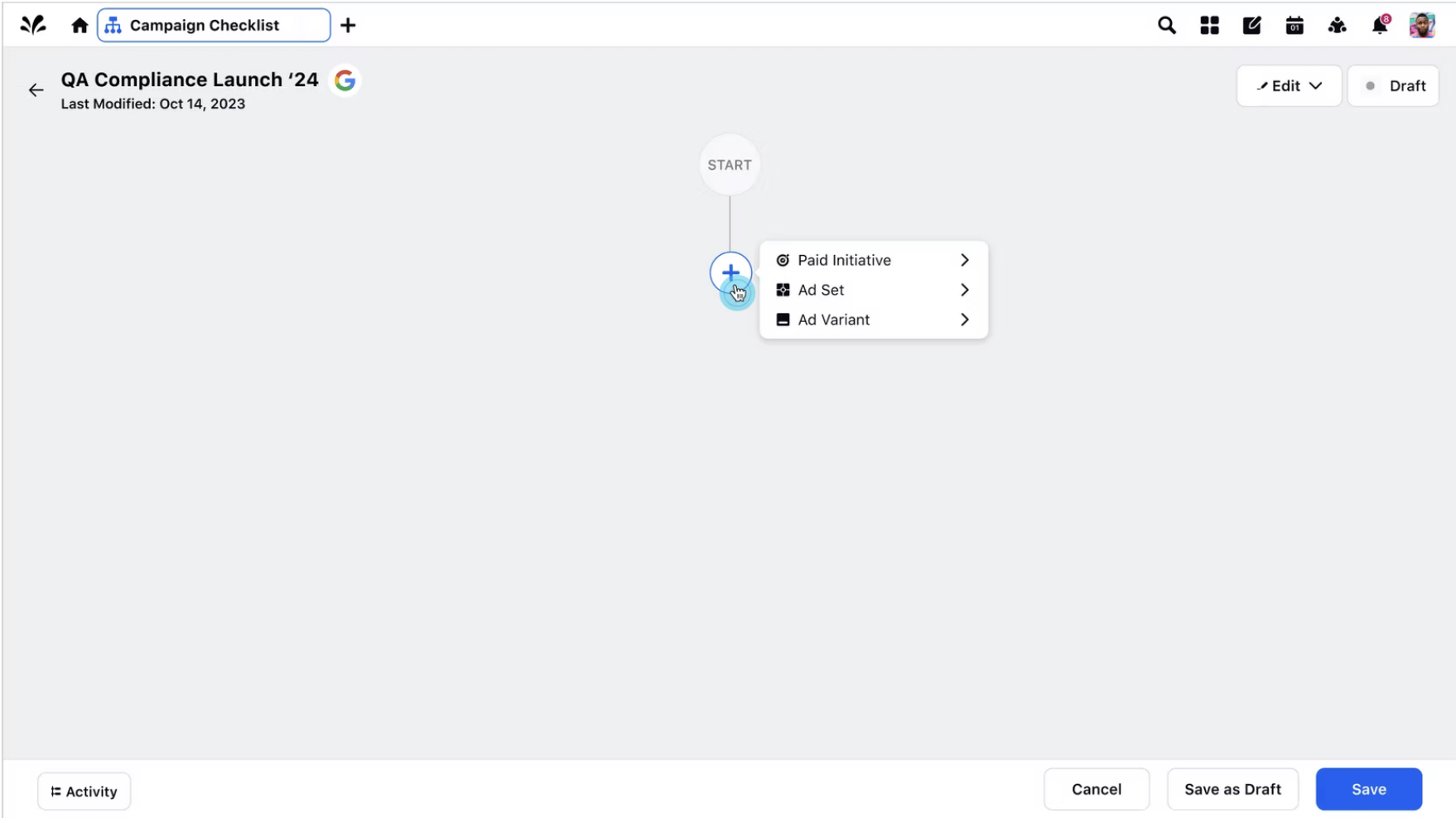
Workflow builder
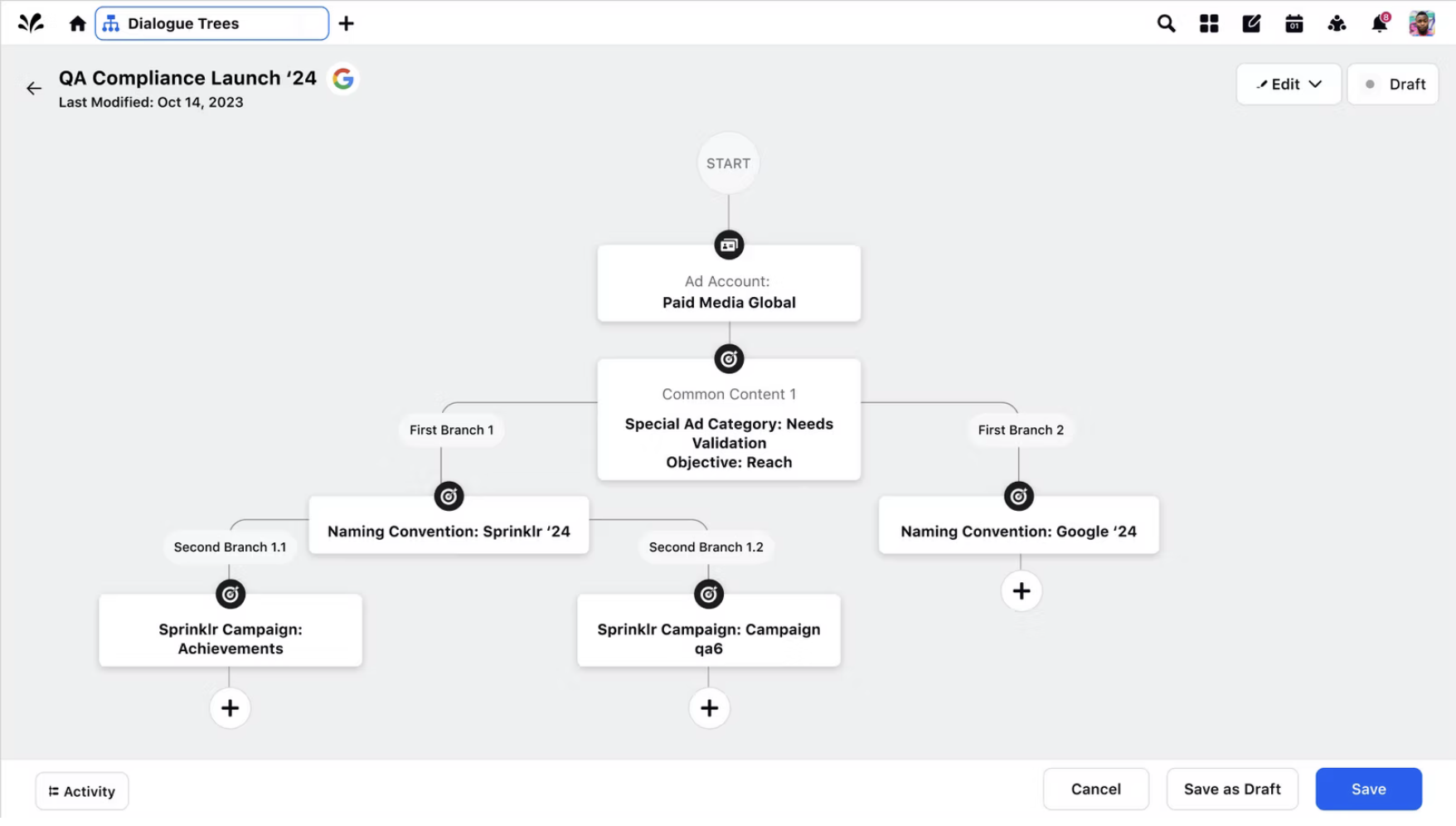
Once the user fills out the form, they are directed here where they can begin filling out what fields they would like to be verified for their campaign.
Completed checklist
This is an example as to what a checklist would look like after filling in all specific fields they would like to be checked.
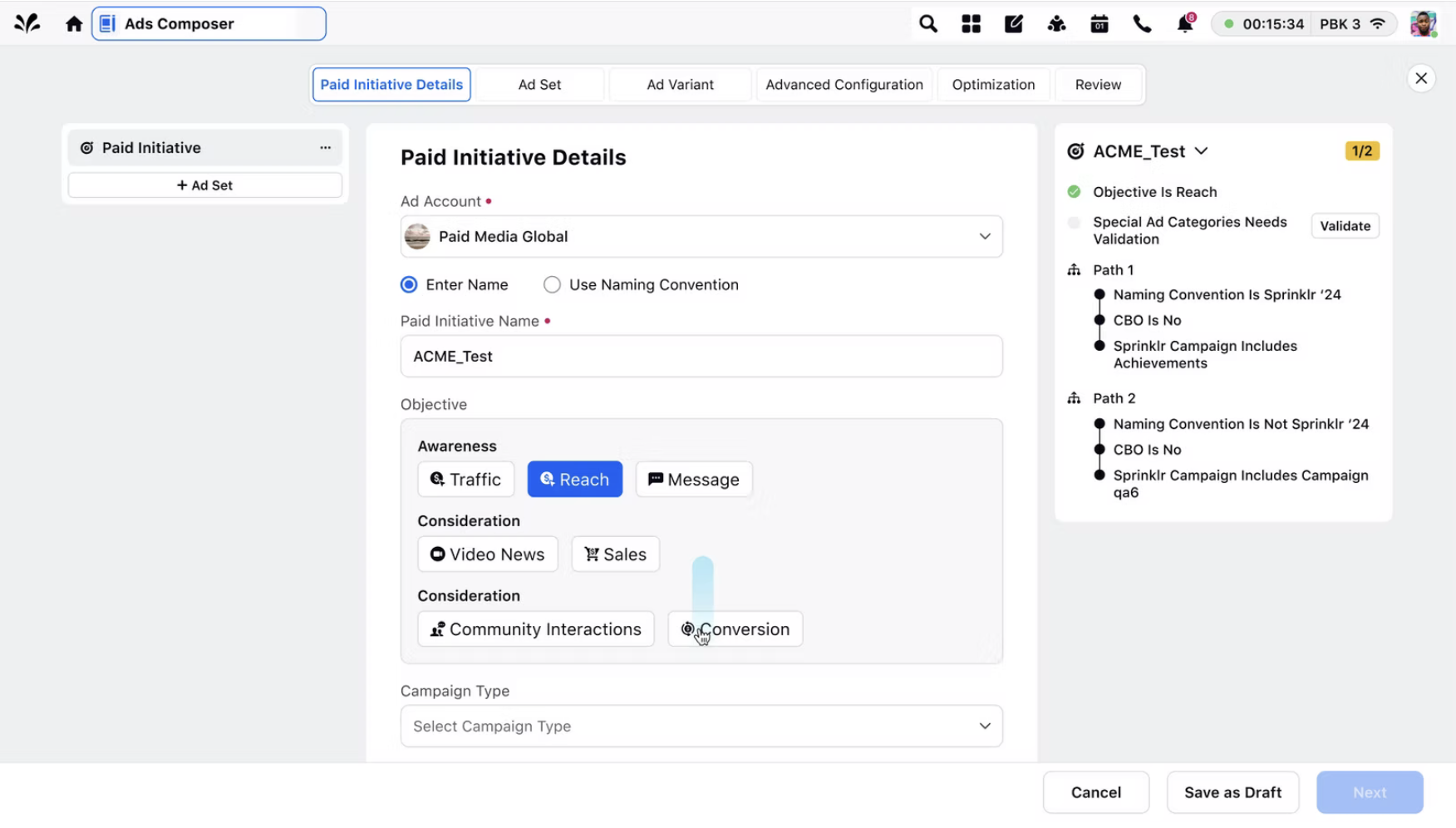
Ads Composer
After the checklist has been completed, users can then direct to Ads Composer where they begin filling out all the necessary fields to create a campaign. They will see the checklist they created on the right column to follow the verification of important fields they need to check.
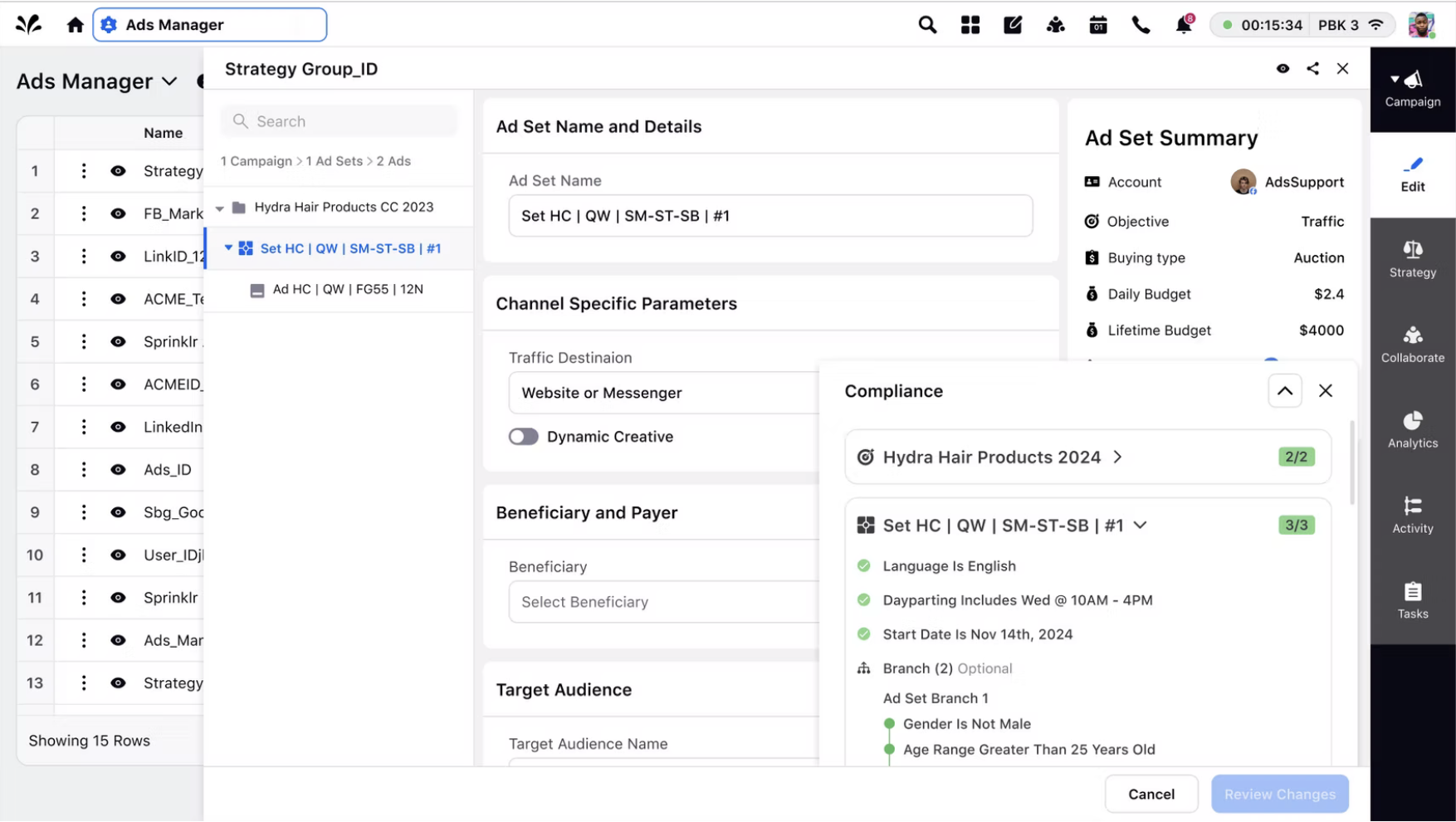
Ads Manager
Another module that users can view and verify the checklist is in Ads Manager. This checklist is shown in a bottom sheet, where users can easily collapse to view all input/select fields.
Challenges
Stakeholder alignment
One area of the platform that we needed to include the checklist feature was within the Ads Manager third pane. Within Ads Manager, there is lots of information already present so I had to find a solution to showcase this checklist that would be visible and easy to check fields. I had to make sure each internal stakeholder was aligned on the approach we took, and how this positioning was the best outcome in creating a simple, intuitive experience.
Timelines
This was another challenge I faced while creating this new feature, as I had to work efficiently and make sure I am meeting design due dates while juggling other tasks within the Advertising module. A key value in this challenge was making sure communication was on par, and giving designs updates each day to keep all stakeholder aligned on where we are at in the process.
What did I learn?
This project helped me learn the importance of designing guardrails within complex workflows rather than leaving it up to the user to find the errors within a campaign. With this integration of validation directly into the campaign setup process, I learned integrating thoughtful designs backed by research can help teams and users maintain brand governance without leading to negative outcomes and execution.
Metrics + Next steps
With the feature now implemented and generally available for all users, we have seen a 15% increase in usability after initial release, showcasing an impact in reducing error prevention and answering the problem of monetary losses and brand accountability issues.
We will continue to monitor and digest the metrics as a team and make any improvements necessary for our users to be satisfied with the product.